
KNOWLEDGE BASE: How to track your bicycle delivery
Waiting for your bicycle to arrive? This guide explains how tracking works, what the different tracking updates mean and how to follow your shipment from collection through to delivery. We’ve answered the most common questions to help you stay informed throughout the journey.
How do I track my bike?
With the online tracking link. Or just ask us. We mainly use the same portal. But in certain cases you may share another link, for another service level, or another provider, ie when you had to send the bicycle overnight from CPT to JHB. And case in point: with the overnight bicycle transfer there might not even be tracking, as it will simple ready, collected, sent, and delivered the next day. As there are very little tracking events concerned. As for the rest, you can usually follow your #bicyclecouriers shipment extensively as it travels from door to depot to depot to delivery.
When do I receive tracking?
The link is active before collection. So, you can share this with the Bikehub buyer or seller, including the waybill number. The drivers don’t always click the collect button live, but most of the time they do. And the tracking starts in earnest once it has been scanned in at the depot later that same afternoon or evening from there you can see through which depots the bicycle go. Up and away.
How often is tracking updated?
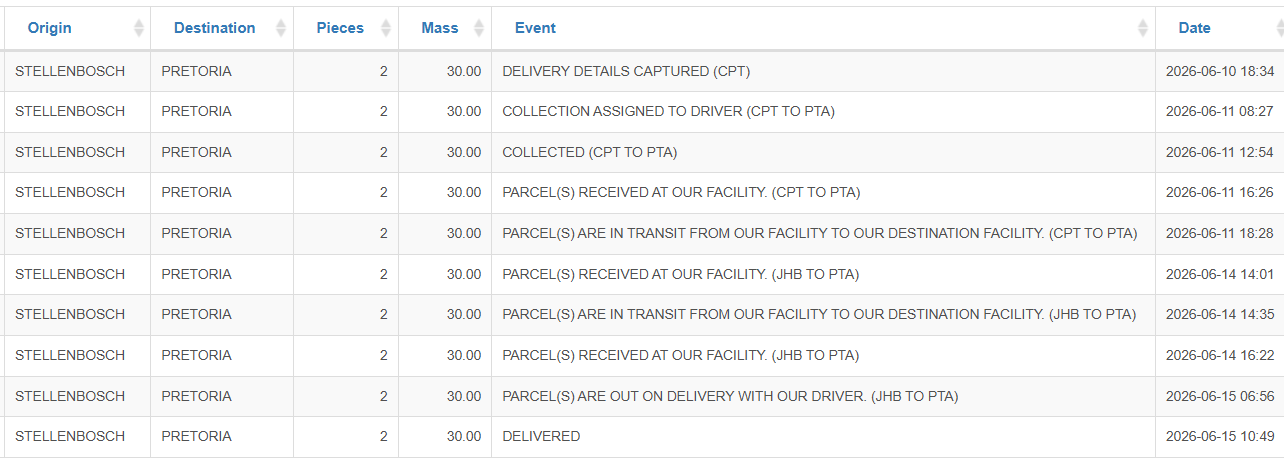
Example right here. It depends on the route and provider. Typically, once the collection has been created. Then once the collection has been done. When it is scanned in at the receiving depot. Then scanned out onto the delivery depot. And received on the floor that side. Second to last when it goes out on delivery with our #bicyclecouriers driver. And finally, once it has been delivered. Example below.
Why has tracking stopped updating?
Three examples here. One of the following reasons. Most often when a PDF waybill wasn’t printed and a manual waybill had to be signed for. Then our back office must manually link the waybill to the one on the system for the public tracking to show. Or when a third party has been used for the final delivery and their systems update less frequently than ours. Or when a driver didn’t scan the item or had limited reception and delayed updates. Then just ask #bicyclecouriers for an update.
Can I contact the driver?
We prefer not. Rather work through our office. The last thing we need is end users sending drivers to and from. Because remember this is a system. And your bike is not the only one being delivered. So please direct all questions first via the tracking link to see what is going on or second to us at #bicyclecouriers that we can get the accurate ETA or relay the message etc etc. It is a safer and more efficient way of delivering.
Can I track multiple bikes?
Yes. There can be many bikes on a single shipment and waybill and tracking link. Or each bike can have its own booking and waybill and tracking link. The tracking link typically also indicates how many bike boxes or items are being sent on that single document. You can decide which is going to be the easiest way to book. If they all go to the same collection and delivery address, then you might as well book them or ask for a single #bicyclecouriers order and waybill.
What do tracking statuses mean?
8x examples right here. ‘Delivery details captured’ means the collection is booked. ‘Collection assigned to driver’ means the pickup instruction went out. ‘Collected’ means your bike is on its way. ‘Received at our facility’ means it is scanned in at the sending depot. ‘In transit’ means the bike is moving the receiving depot. Note there may be more than one, depending on the route. There will be another ‘received at our facility’ or ‘floor’ on the receiving end. Then ‘out on delivery with our driver’ and finally ‘delivered’ with a final timestamp. Tada! Another successful #bicyclecouriers delivery.
Can someone else receive tracking updates?
Yes. You can share the tracking link with them if you want to. We don’t recommend it. Rather keep it private wherever and whenever possible. You can always check and just manually inform them. But in the case of the Bikehub bike sales then you most often have to share the waybill number and the tracking link on their platform. As peace of mind for both parties. And to reduce the number of back-and-forth questions. #bicyclecouriers like that!
How do I know when delivery is complete?
One of three ways. (A) There will be a bicycle in your hands. (B) Or the bike shop will contract you to say that your bike has arrived. (C) Or we will email you a completed order and tracking link and request to review our services. Because the reviews and testimonials are very important for us and do help our rankings. So please tell us what it was like – and tell your mates. And then where can we send your NEXT bicycle on #bicyclecouriers.
What if my tracking link doesn’t work?
Contact us. We can check internally. And speak to the respective depot managers. Most often it is a manual vs preprinted waybill that needs to be updated online. Or there might have been a glitch with the scanning device from the driver or depot (no or delayed signal etc) which causes the tracking to pause. Our team can manually link or update if request. Or just ask #bicyclecouriers (preferably on WhatsApp or email) where the bicycle is.
