

What can we learn from the MAKE webhook automation?
MAKE or break for the MAKE automation. The latter in this example. But we fixed it. This is how. If you delete an order from WooCommerce. But it still shows in your google sheet. And you then run your automation from the google sheet. Then the automation breaks because it cannot find the order ID in your WOO database anymore. And the automation stops. BUT… it still builds up a queue of actionable items afterwards. So, you can fix the automation. And it continues from that point onwards. And processes all the items in your queue. So, you don’t have to go and do it manually. I love the sound of that.
The MAKE webhook queue in practice…
Because if something stops then 50x orders pile up quickly and easily. And now there is no need to go and manually ask for a customer review. You can simply let the queue drip through, and everyone will still get their emails requests. And your reviews will come in. Under promise and overdeliver. Which leads to happy customers. And good reviews. Which is why we made this automation in the first place.
How can we change the MAKE automation to not break when it runs after a WooCommerce order has been deleted?
First things first. Why would we want to run the automation after an order has been deleted? Simple. It happens from time to time that someone makes a duplicate booking or maybe first books to pay via credit card and then decides to rather pay via EFT. And iso changing the payment method they rather just book from scratch. Which triggers a new order number. And then we want to delete the first one. But our standard automation trigger email is along the lines of thanks your order has been done and dusted and now please rate our service. Which is not required in this instance. So iso sending a manual email or second automation. It may be easier just to delete the original order. And then tick ‘done’ from the spreadsheet. But this is where it will stop. And what we must change. So how can we do it?
Making the automation fault-tolerant, so one unusual order cannot block every valid order behind it.
The workflow will be as follows: Tick “done” in Google Sheets → Make tries to retrieve the order → if found, continue normally → if deleted, mark it skipped and move on → the scenario does not stop → queued orders continue processing. How do we do it practically in MAKE? Right-click the purple WooCommerce – Update an Order module. Select: Add error handler. Make should create a dotted error-handling route below the WooCommerce module. Choose the Skip error handler. A Skip handler removes only the failed item from the scenario. It does not pass that deleted order to the Sleep or Outlook modules, and Make can continue processing later webhook items. Which is exactly what we want. Just like in the screenshot below:
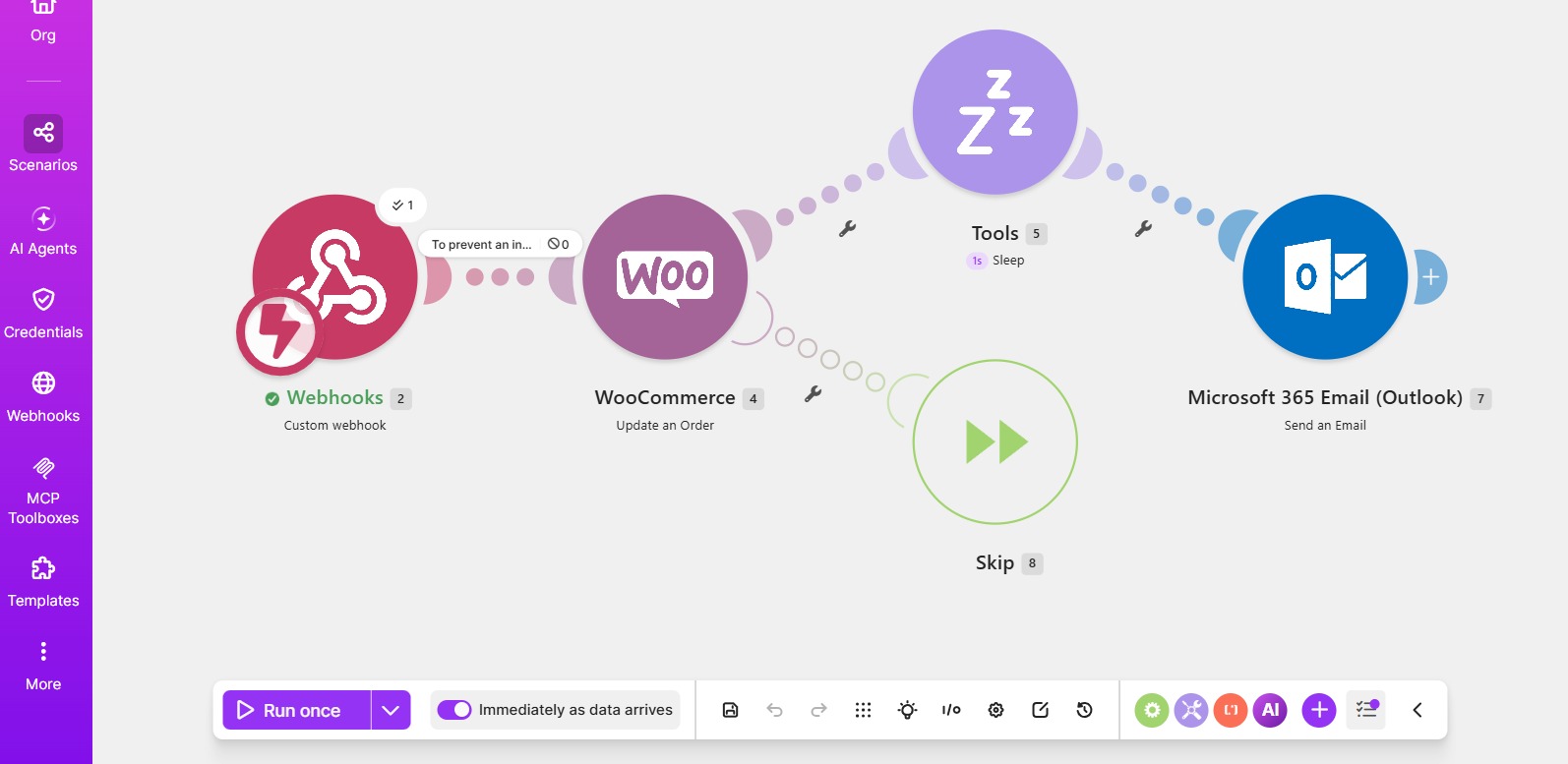
*Great success. All done. Automation back on. And queue processed. So the good vibrations reviews can start rolling in again.


