

KARGO: New service provider means new tools
Yes we have over a dozen existing service providers working with bicycle couriers. But there is always room for one more. The KARGO platform reminds me of DSV. Custom and old school iso new and open or white labelled. We’ve spoken about the ease of use of Couriermate and Parcel Perfect many times before. Let’s see what the KARGO portal offers and how we can use it to send boxed bicycles, vending machines, and so much more. There is also a kargo zone map showing all the rates areas across SA and into neighboring countries. But curiously there is no help file. At least that I could see.
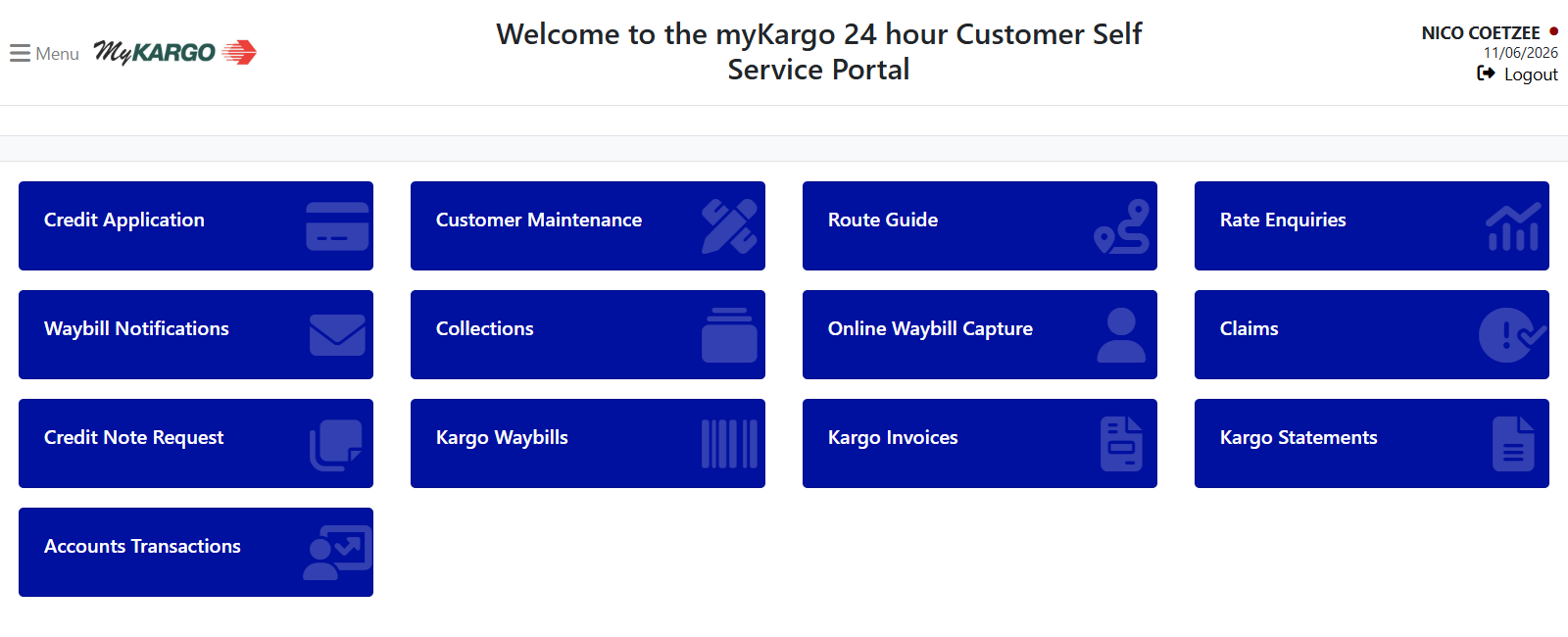
First you gather info…
- Credit application – done. What you need to complete to open your account. And go through the credit check process. How many times have the bicycle couriers admin team gone through this process before? Many more than KARGO before.
- Customer maintenance – add sender and recipient details. Like bank beneficiaries. To and from where you will be collecting and delivering items. Like boxed bicycles. I really hope these fields also autosave when you do new bookings. Like with Couriermate or Parcel Perfect. Thanks KARGO.
- Route guide – this was cool. You enter the origin and destination. And it gives you the closest depots through which the item will move. And how long it will take to deliver the boxed bicycle. Usually 3 days for main centers and longer for remote. Our current SLA is 3-5 working days but in practice often quicker. I do like the fact that KARGO also has their own DBN depot for oversized items.
- Rate enquiries – get a quote. Enter the to and from suburbs and item dimensions. To see the price. In our case we work with standard bikebox dims of 160*30*80cms. And about 30kg. But this can change. Because there are more and more ebikes being sent these days. And they may take up more space.
Then you send the bicycles…
- Waybill notifications – images and PODs. Which stand for proof of delivery. Doesn’t look like you can enter any info on this page. It is just for reference. To see what has been delivered. And signed for. And loaded from the backoffice. So that you can tell recipients when bicycles have been delivered. And who received it. As per instruction to bicycle couriers and in turn to KARGO.
- Collections – book a new bicycle pickup. We need the following info: (A) when – (B) sender details and address – (C) recipient details and address – (D) customer collections details and (E) item weights and dimensions.
- Online waybill capture – create new waybills right here. *These are Waybills captured Online by the customer. This is called the Customer Interim Area and only Submitted Waybills will be transferred to Kargo’s Operation System. And please note that this is not a collection. Please use the collections menu to place a collection for boxed bicycles and more…
And for month end admin…
- Claims – guessing you can only claim if you opt in to the additional insurance. Which reminds me of how taken aback I was when I put in so much time and effort to get a short term insurance product for boxed bicycle GIT in place and sell it at just 1% of the value of the bike. And then seemingly nobody bought it. even though is costs only 1/3rd of what is typically available through other courier companies.
- Credit note request – request a refund. Well, not a cash refund into your bank account. rather a credit note against your existing kargo account. probably for when there are duplicate waybills. Or a system generated PDF waybill was created yet the collection took place on a manual written waybill for some reason. We’ve seen it all.
- Kargo waybills – note that These are Waybills on the Kargo Operations system. A list only – not where you create new waybills. I hope the process flow for making a new booking is the same convention as elsewhere. Ie get a quote. Accept the quote to a collection. Which triggers a PDF waybill being generated. And that you can send to your customer. Which will be the sender of the boxed bicycle in our case. And can be used for BIKEHUB sales etc.
- Kargo invoices – search for all invoices on your account. Lovely for tax season. Because now you don’t need to save all the PDF invoices into a folder every month. Or go back and scan through emails for all the documents. Just log in and grab them from here. Also a timely reminder of what it costs to send boxed bicycles from (A) to (B).
See all movement on your KARGO account…
- Kargo statements – a list of all statements on your account. View the account number. Account name. And statement date. And I had my info for bicycle couriers in the initial screenshot above but duly removed it. so that you cannot send boxed bikes on my account without my knowledge.
- Accounts transactions – looks like all deliveries on the account. And other actions. So here you should be able to see a line item for each accounting transaction. Including the following. Adjustment. Refund. Credit note. Debit note. Recipient. Invoice. Prepayment. Unapplied cash. And more.
Oh and please note
- Additional insurance coverage on consignments can be requested and should be indicated when creating the waybill. This must be done prior to dispatching the consignment by the sender and only applies if the account holder pays the compulsory insurance coverage charge. Please ensure that items are appropriately packed and secured to reduce damages. Palletizing or crating is recommended for larger shipments as it streamlines handling and provides structural security.
- All consignments must be clearly labeled and securely packed. Larger shipments should be in a crate or palletized. This protects your consignment and helps us deliver it safely and on time.
- Saturday, Sunday, public holidays, and after-hours collections and deliveries must be pre-arranged with the relevant branch.
Ready set go. Book your boxed bicycle transport with us right now.


1 Comment
And when creating a new collection there is just 4x quadrants to complete…
1. top-left = sender details
2. top-right = recipient details
3. bottom-left = collection times+instructions
4. bottom-right = the odd one out – as here you pick the RECEIVING depot and enter the nr of parcels and total weight (the CSD agent said entering either actual or volumetric weight is fine, I entered actual)